Dynamics GP eCommerce rolls all of your distribution and logistics management directly into your eCommerce portal, creating a consolidated, easily managed system that will simplify maintenance and operations. Through Dynamics GP eCommerce, you’ll have a single data warehouse, maintain real-time product information, and be able to provide superior customer service.
1. Determining Your Deployment Strategy
MS Dynamics GP eCommerce can be rolled out as either a fully cloud-based system or a hybrid solution. A fully cloud-based system is managed completely through the Internet, while a hybrid solution connects to an on-premise deployment of MS Dynamics GP. For companies that already have MS Dynamics GP on-premise, a hybrid solution may make more sense; for companies that are transitioning to MS Dynamics GP, an all-in-one cloud-based system is usually preferred.
There are advantages to both a cloud-based and hybrid solution, depending on your business needs and size. When it comes to cloud-based solutions, they tend to be easier to scale and more reliable, in addition to being more accessible to employees. A cloud-based solution can be accessed from anywhere in the world, on either mobile or desktop devices. While customerswill always be able to access your eCommerce portal, employees will find it more difficult to connect to your ERP solution from out of the office with an on-premise solution.
On-premise Microsoft Dynamics GP can be advisable in some solutions — most specifically, for larger enterprises that are concerned about either latency or security. MS Dynamics GP will run faster on an on-premise network and is generally considered to be more secure, as there are fewer points of access. It’s worth noting that Microsoft has been slowly moving away from on-premise installation, however, and is currently trying to push most of its products towards a fully cloud-based environment.
Cloud-based environments have a final, additional benefit: they are generally managed, monitored, and maintained primarily by the hosting service. Though internal IT, staff will need to provide in-house troubleshooting and data maintenance, and the accessibility and backups of the platform itself will be performed by the host. This alleviates much of the daily burden on internal IT teams.
2. Documenting Your Business Processes
MS Dynamics ERP will be integrated into virtually every level of your company’s operations. Before you can determine what you need from MS Dynamics GP and its integrated eCommerce portal, you need thorough documentation of your operational processes. This includes logistics, inventory handling, shipping, pricing structures, discounts, loyalty programs — anything that has to do with orders, fulfillment, and customer service. Your ERP solution will become an all-in-one resource for your inventory, financials, and customer support. Because of this, you first need to know exactly what your business does on a daily, monthly, and annual level.
Failing to properly document your business processes will often end up with missing features, which can both tie up business operations and taint employees against the new system. There are many business operations that may either be undocumented or unknown to upper management because employees complete them routinely. Missing out on these business processes could skip critical steps in the ordering and fulfillment process, and could even require a restructuring of the ERP solution.
A business process check-list can be used to make sure that nothing is missed when it comes to documenting your operations. At the same time, an overview of your disaster preparedness procedures can also be done, to ensure that your new ERP and eCommerce portal will be able to fit into or meet your current standards and requirements. A documented business process will also come in handy for future investors, business loans, and general business plans.

MS Dynamics GP’s ability to streamline and apply cash receipts is just one example of how it can help your business processes.
3. Identifying Your Licensing and Configuration Needs
As with any ERP and eCommerce solution, Microsoft Dynamics GP eCommerce operates best when it is configured directly for your needs. This begins by determining the features and modules that your organization requires, in addition to your licensing requirements — how many employees will be utilizing your eCommerce solution, and how much traffic you can reasonably expect to experience. As a cloud-based platform, you will not need to invest in any infrastructure for the eCommerce portal. Instead, you simply pay a low monthly fee based on the amount of activity your business is currently generating. As your business grows, this will become even more cost-effective; rather than having to upgrade systems, you can simply add licenses and modules.
Your configuration should begin with a “wish list” of the features that youneed, in addition to the features that you want. Many business owners can involve their employees within this process, to get a better picture of how their operations run and the features that their employees truly desire. From there, an experienced partner in MS Dynamics GP can go through your wish list to determine the features that will be easy and cost-effective to deploy. MS Dynamics GP eCommerce comes with a wide variety of solutions that can be tailored to any organization, depending on the organization’s size and industry. Through APIs, MS Dynamics GP eCommerce can also be custom-coded for a business, creating critical business features for unique operations.
The more carefully the system is configured and customized, the more streamlined, effective, and efficient business operations will be. On the eCommerce side, the eCommerce portal may also need to be tailored towards user experience and accessibility, depending on the company’s existing infrastructure.
4. Preparing Your Data for Migration
Most businesses will be moving from another system, such as moving away from QuickBooks and towards Microsoft Dynamics GP. Before this transition takes place, the data will need to be prepared properly. Redundant and unnecessary data should be removed and older information should be archived. Data should be reviewed for any errors and corrected before the transition occurs, to ensure that the data is ported over correctly. There should also be a plan in place for how the data will be migrated and how the transition will occur. Some companies decide to translate their data all at once. Others use data from both systems for some time. And still others use a “rolling” data migration that brings over critical data at first and other data later on. It all will depend on your current infrastructure, how much data you have, and how quickly the transition would have to be completed.
Once data has been successfully migrated to MS Dynamics GP, it will need to be thoroughly reviewed and tested. An MS Dynamics GP eCommerce integration may require data from two sources: your existing ERP solution and your existing eCommerce solution. Any time data has to be transitioned from multiple sources, it also often needs to be reconciled. Because of this and other reasons, it’s almost always ideal to have an expert partner who can look over your data and advise the best way of migrating it. Before you move forward with the use of your new ERP and eCommerce solution, you will have to validate that the data migrated over correctly and that there are no duplicates, redundant copies, or stray “orphaned” information that has not been appropriately categorized.
Whenever possible, data migration should occur all at once. Rolling migrations can cause some issues later on — as data gets overwritten — and utilizing two systems at once can easily introduce errors.
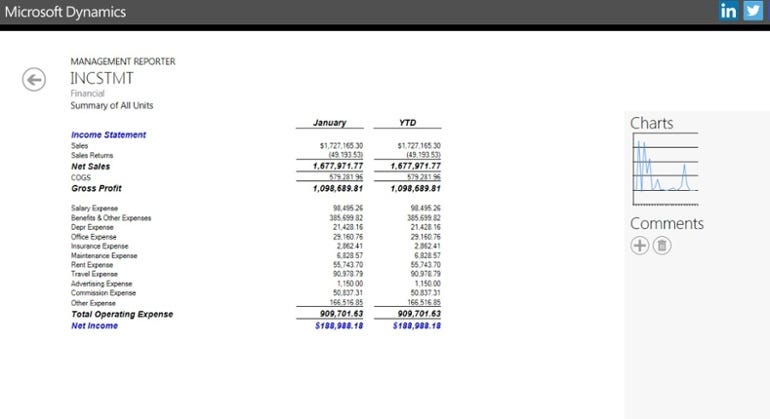
Once your data is migrated to Microsoft Dynamics GP, reports & other features make it simple to track your data and business processes.
5. Complete Employee Training
A new solution is only as effective as the employees who use it. A Microsoft Dynamics GP partner, such as the experts at IES, can provide training to your employees to ensure that they are using the system as effectively as possible. The more familiar employees are with their new software solution, the less uncomfortable they will be with the transition — and the fewer errors that will occur. Mistakes by employees are one of the top issues when it comes to data corruption, data loss, and even system vulnerabilities.
MS Dynamics GP eCommerce is a fairly intuitive solution for most employees, as it uses technology that they are very familiar with: Microsoft products and online frameworks. Nevertheless, employees will need training in specific areas of the program, such as how to enter in data and how to react with reports. Without this training, they may not be able to effectively use the customized and critical parts of the system. Even employees who are already familiar with MS Dynamics and MS Dynamics GP may need a refresher in order to learn about these new and custom systems.
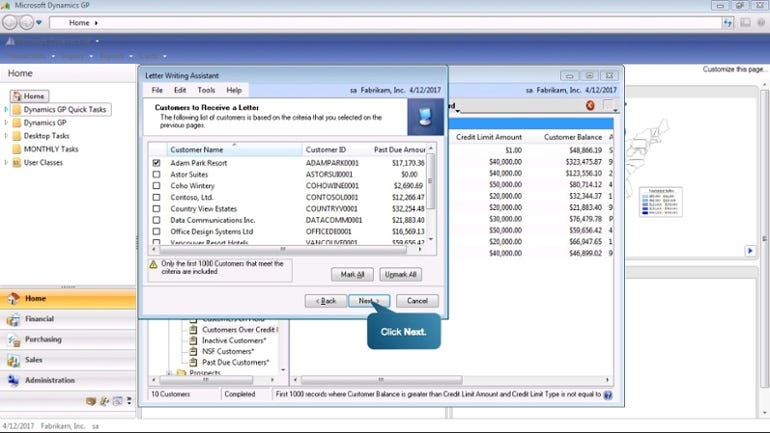
MS Dynamics GP also has guided tours implemented directly into the software
MS Dynamics GP will likely become one of the most — if not the most — frequently used software solutions for your employees. The better they are at its use, the more productive your business will become at all levels. Enhanced training additionally alleviates much of the burden from your in-house IT staff, as they will not be required to train and troubleshoot with employees themselves. Contact IES today to learn more about the benefits ofMS Dynamics GP and integrated eCommerce solutions — in addition to learning about IES’ extensive training and support.
Originally published at blog.iesgp.com.