Thursday, 25 August 2016

Steps for Implementing Dynamics GP eCommerce

Dynamics GP eCommerce rolls all of your distribution and logistics management directly into your eCommerce portal, creating a consolidated, easily managed system that will simplify maintenance and operations. Through Dynamics GP eCommerce, you’ll have a single data warehouse, maintain real-time product information, and be able to provide superior customer service.

1. Determining Your Deployment Strategy

MS Dynamics GP eCommerce can be rolled out as either a fully cloud-based system or a hybrid solution. A fully cloud-based system is managed completely through the Internet, while a hybrid solution connects to an on-premise deployment of MS Dynamics GP. For companies that already have MS Dynamics GP on-premise, a hybrid solution may make more sense; for companies that are transitioning to MS Dynamics GP, an all-in-one cloud-based system is usually preferred.
There are advantages to both a cloud-based and hybrid solution, depending on your business needs and size. When it comes to cloud-based solutions, they tend to be easier to scale and more reliable, in addition to being more accessible to employees. A cloud-based solution can be accessed from anywhere in the world, on either mobile or desktop devices. While customerswill always be able to access your eCommerce portal, employees will find it more difficult to connect to your ERP solution from out of the office with an on-premise solution.
On-premise Microsoft Dynamics GP can be advisable in some solutions — most specifically, for larger enterprises that are concerned about either latency or security. MS Dynamics GP will run faster on an on-premise network and is generally considered to be more secure, as there are fewer points of access. It’s worth noting that Microsoft has been slowly moving away from on-premise installation, however, and is currently trying to push most of its products towards a fully cloud-based environment.
Cloud-based environments have a final, additional benefit: they are generally managed, monitored, and maintained primarily by the hosting service. Though internal IT, staff will need to provide in-house troubleshooting and data maintenance, and the accessibility and backups of the platform itself will be performed by the host. This alleviates much of the daily burden on internal IT teams.

2. Documenting Your Business Processes

MS Dynamics ERP will be integrated into virtually every level of your company’s operations. Before you can determine what you need from MS Dynamics GP and its integrated eCommerce portal, you need thorough documentation of your operational processes. This includes logistics, inventory handling, shipping, pricing structures, discounts, loyalty programs — anything that has to do with orders, fulfillment, and customer service. Your ERP solution will become an all-in-one resource for your inventory, financials, and customer support. Because of this, you first need to know exactly what your business does on a daily, monthly, and annual level.
Failing to properly document your business processes will often end up with missing features, which can both tie up business operations and taint employees against the new system. There are many business operations that may either be undocumented or unknown to upper management because employees complete them routinely. Missing out on these business processes could skip critical steps in the ordering and fulfillment process, and could even require a restructuring of the ERP solution.
A business process check-list can be used to make sure that nothing is missed when it comes to documenting your operations. At the same time, an overview of your disaster preparedness procedures can also be done, to ensure that your new ERP and eCommerce portal will be able to fit into or meet your current standards and requirements. A documented business process will also come in handy for future investors, business loans, and general business plans.
MS Dynamics GP’s ability to streamline and apply cash receipts is just one example of how it can help your business processes.

3. Identifying Your Licensing and Configuration Needs

As with any ERP and eCommerce solution, Microsoft Dynamics GP eCommerce operates best when it is configured directly for your needs. This begins by determining the features and modules that your organization requires, in addition to your licensing requirements — how many employees will be utilizing your eCommerce solution, and how much traffic you can reasonably expect to experience. As a cloud-based platform, you will not need to invest in any infrastructure for the eCommerce portal. Instead, you simply pay a low monthly fee based on the amount of activity your business is currently generating. As your business grows, this will become even more cost-effective; rather than having to upgrade systems, you can simply add licenses and modules.
Your configuration should begin with a “wish list” of the features that youneed, in addition to the features that you want. Many business owners can involve their employees within this process, to get a better picture of how their operations run and the features that their employees truly desire. From there, an experienced partner in MS Dynamics GP can go through your wish list to determine the features that will be easy and cost-effective to deploy. MS Dynamics GP eCommerce comes with a wide variety of solutions that can be tailored to any organization, depending on the organization’s size and industry. Through APIs, MS Dynamics GP eCommerce can also be custom-coded for a business, creating critical business features for unique operations.
The more carefully the system is configured and customized, the more streamlined, effective, and efficient business operations will be. On the eCommerce side, the eCommerce portal may also need to be tailored towards user experience and accessibility, depending on the company’s existing infrastructure.

4. Preparing Your Data for Migration

Most businesses will be moving from another system, such as moving away from QuickBooks and towards Microsoft Dynamics GP. Before this transition takes place, the data will need to be prepared properly. Redundant and unnecessary data should be removed and older information should be archived. Data should be reviewed for any errors and corrected before the transition occurs, to ensure that the data is ported over correctly. There should also be a plan in place for how the data will be migrated and how the transition will occur. Some companies decide to translate their data all at once. Others use data from both systems for some time. And still others use a “rolling” data migration that brings over critical data at first and other data later on. It all will depend on your current infrastructure, how much data you have, and how quickly the transition would have to be completed.
Once data has been successfully migrated to MS Dynamics GP, it will need to be thoroughly reviewed and tested. An MS Dynamics GP eCommerce integration may require data from two sources: your existing ERP solution and your existing eCommerce solution. Any time data has to be transitioned from multiple sources, it also often needs to be reconciled. Because of this and other reasons, it’s almost always ideal to have an expert partner who can look over your data and advise the best way of migrating it. Before you move forward with the use of your new ERP and eCommerce solution, you will have to validate that the data migrated over correctly and that there are no duplicates, redundant copies, or stray “orphaned” information that has not been appropriately categorized.
Whenever possible, data migration should occur all at once. Rolling migrations can cause some issues later on — as data gets overwritten — and utilizing two systems at once can easily introduce errors.
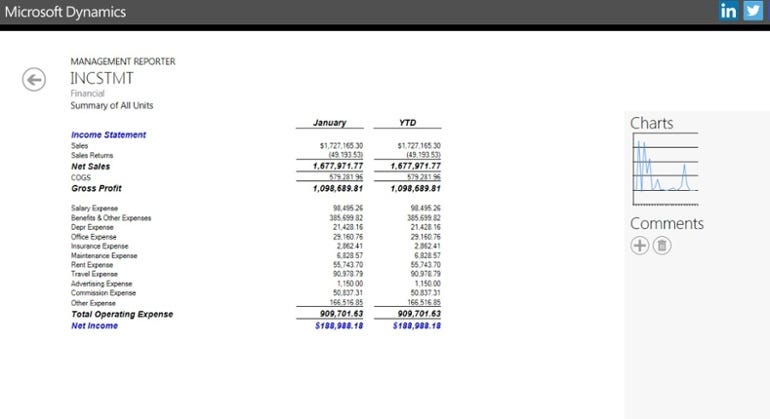
Once your data is migrated to Microsoft Dynamics GP, reports & other features make it simple to track your data and business processes.

5. Complete Employee Training

A new solution is only as effective as the employees who use it. A Microsoft Dynamics GP partner, such as the experts at IES, can provide training to your employees to ensure that they are using the system as effectively as possible. The more familiar employees are with their new software solution, the less uncomfortable they will be with the transition — and the fewer errors that will occur. Mistakes by employees are one of the top issues when it comes to data corruption, data loss, and even system vulnerabilities.
MS Dynamics GP eCommerce is a fairly intuitive solution for most employees, as it uses technology that they are very familiar with: Microsoft products and online frameworks. Nevertheless, employees will need training in specific areas of the program, such as how to enter in data and how to react with reports. Without this training, they may not be able to effectively use the customized and critical parts of the system. Even employees who are already familiar with MS Dynamics and MS Dynamics GP may need a refresher in order to learn about these new and custom systems.
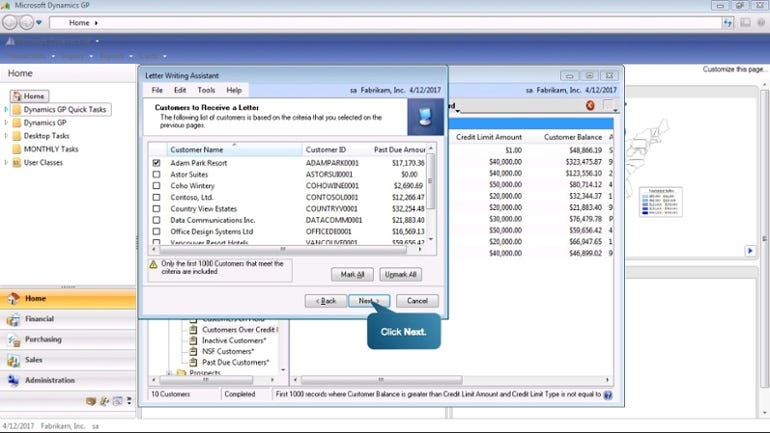
MS Dynamics GP also has guided tours implemented directly into the software
MS Dynamics GP will likely become one of the most — if not the most — frequently used software solutions for your employees. The better they are at its use, the more productive your business will become at all levels. Enhanced training additionally alleviates much of the burden from your in-house IT staff, as they will not be required to train and troubleshoot with employees themselves. Contact IES today to learn more about the benefits ofMS Dynamics GP and integrated eCommerce solutions — in addition to learning about IES’ extensive training and support.

Originally published at blog.iesgp.com.

Adding an Ecommerce Shopping Cart to Microsoft Dynamics GP

Microsoft Dynamics GP takes care of virtually all of your business needs. But did you know that it can also take care of your storefront? By adding an e-Commerce shopping cart to Microsoft Dynamics GP, you can handle all ofyour sales, order processing, and inventory handling through a single consolidated platform. This streamlined system will save on both administrative hours and expenses. There are a few different options available depending on your company’s needs.

Get a Third-Party App

Many e-Commerce shopping cart suites support Microsoft Dynamics GP out of the box. These shopping carts usually need to be configured or have additional plug-ins installed, and then they will port data directly to and from Microsoft Dynamics GP. This is one of the major advantages of MS Dynamics: it’s popular and well-supported enough that many integrated features are already available.
Many e-Commerce shopping carts will come with additional commerce solutions, making this one of the fastest and easiest ways to deploy. The only caveat is that you will be limited by the feature set of the third-party solution. There are both open source solutions and commercial solutions available depending on the needs of your company.

Use a Middleware Integrator

If you’re going to be tying together multiple applications, a middleware solution may be your best bet. A middleware platform will act as an intermediary between all of your network’s applications, syncing and trading data back and forth. Through a middleware integrator, you can generally link together a variety of solutions: Microsoft Dynamics GP, third-party shopping carts, and more. The best way to perform this type of integration is with an MS Dynamics expert. A middleware integrator frees you to add to your system later on, if you suspect that your e-Commerce solution may eventually grow in complexity. It’s also usually the best option if you have an e-Commerce shopping cart that doesn’t natively support MS Dynamics GP.

Develop From the Ground Up

With the aid of the Microsoft Dynamics GP API, it is possible to develop a custom solution. This is generally only useful if the business is exceptionally unique or has unusually high requirements. Developing from the ground up is the most costly and time-consuming solution, but it does offer a business a completely proprietary, tailored solution. Developing from the ground up is the most difficult task, and thus requires an expert to maintain not only the stability of the system but also the security of the e-Commerce functions. Developing a custom solution can also sometimes be done with the aid of an open source integrator as an entry point.
Because Microsoft Dynamics GP can be well-integrated into a variety of e-Commerce platforms, it’s important to have the advice of an expert. Integration can be a costly and complex process if it’s not performed by an expert with the right tools. A Microsoft Dynamics GP partner can give you more information on the best products for your business, in addition to guidance throughout the process of integration. Contact IES today to learn more about getting your Microsoft Dynamics GP shopping cart up and running.
Image Source: Tech in Asia

Originally published at blog.iesgp.com.
Microsoft Dynamics Magento Integration: 5 Tips

Through Microsoft Dynamics Magento integration, businesses can streamline the entire process of sales and customer management, avoiding duplicate entries and the maintenance of multiple systems. Everything from accurate inventory quantities, projected stocking needs, and shipping and product addresses can be stored and shared within the two suites. But as with any integration, there are some important things to remember.

1. Choose the right type of integration from the start.

Microsoft Dynamics and Magento are both very flexible when it comes to third-party integration — and that means there are multiple options that you can choose. Multi-channel management solutions are ideal if you have multiple software suites you need to connect. The Dynamics GP to Magento connector is a simple and direct solution — but it is usually only suitable for online marketplaces and has limited scope. Custom development is usually necessary for more complex enterprises, and will ensure that both systems work perfectly together.

2. Figure out which features you actually need.

More features isn’t always better. Microsoft Dynamics and Magento both offer an entire, full service consolidated suite of products, ranging from multiple storefront support to discounts and cross-promotions. Pare down the features in both suites to the ones that your business actually needs — otherwise the integration and the software itself will seem far more complex than it really needs to be.

3. Create protocols for patches and upgrades.

Security is the primary concern when it comes to linking something as mission critical as a CRM system to an e-commerce suite. Patches, upgrades, and other maintenance need to have careful protocols designed to ensure that they are completed in a timely fashion. Both systems have to remain updated to their most current compatible versions — but they also can’t be upgraded past compatibility, which requires some planning.

4. Configure caching through Microsoft Dynamics and Magento.

Caching will speed up the system as a whole — important when you’re relying upon two systems to work effectively together. Of these, it’s important to make sure that Magento is configured properly, as Magento will control the speed of your storefront as well as the backend that you and your employees will be using.

5. Make sure you select the right host.

Magento is an e-Commerce storefront and not all e-Commerce hosts are made equal. If you’re going to tie your Magento system to your Microsoft Dynamics solution, you should find a host that is not only reliable but alsospecializes in Magento installations. You may also want to consider utilizing a single cloud server solution for both products, which will reduce your costs and the maintenance involved.
Once a Microsoft Dynamics Magento integration is properly configured, employees and customers alike will have a better user experience overall. Inventory will be automatically updated, customer histories will be consolidated, and order processing will be both faster and streamlined. But the actual integration between these two complex suites can require some customization and some maintenance. Working with an experienced partner such as IES can help. Contact IES today to learn more about the benefits of Microsoft Dynamics Magento integration and the process behind it.

Originally published at blog.iesgp.com.
Thursday, 28 July 2016

5 Barriers to Success During Magento-Dynamics GP Integration

Magento CRM is a valuable, all-in-one customer relationship tool, but that doesn’t mean thatMagento CRM integrationis a trivial process. Though Magento CRM may be fast to deploy, it needs to be customized to your company’s unique requirements. Below, we share a few of the traditional barriers to success during aMagento CRM integration.

5 Barriers to Success During Magento CRM Integration You Need to Know

1. Not Creating a Proper Data Transition Plan

When transitioning your data to Magento CRM, you will often need a multi-phase deployment — initially transferring over your static information and later transferring your live data when your organization is outside of business hours. Data additionally needs to be verified to ensure that the transfer was done correctly.

2. Attempting Unsupported Third-Party Integration

Not all third-party solutions are able to be integrated with Magento CRM. In particular, legacy solutions or proprietary solutions may not be able to be integrated with Magento without some work. While a professional service may be able to create an integration between these systems, it will have to be developed specifically for your organization.

3. Committing to Training Too Late

Not all issues with Magento CRM are purely technical ones. A customer relationship management solution will need to be worked with closely by your employees. Training and familiarization needs to begin early on in the transition process if your employees are going to be able to adjust easily. Once the integration has been completed, your employees will need to have access to support as they continue to learn.

4. Failing to Transfer the Proper Permissions

When initializing a CRM solution, the proper permissions need to be given for each employee and administrator. Security permissions have to be given only on the level that each employee or administrator truly needs; otherwise you could create a security issue or make it difficult for employees to complete their work.

5. Not Leveraging Advanced Magento CRM Features

Magento CRM offers many advanced features in terms of analysis, accessibility, and integration. Organizations that transition to Magento CRM without guidance may only seek to duplicate the features that their previous CRM provided. By digging deep into dynamic GP Ecommerce and learning more about it, you can gain access to all of the power that the platform provides.
As with any radical adjustment to your organization’s infrastructure, it’s always best to involve a professional. A partner skilled and experienced inMagento CRM integrationwill make it easier for your business to transition to Magento CRM without any of the potential pitfalls listed above. To talk with an expert partner, contact us today.

Microsoft Great Plains Consulting: 3 Things to Ask Your Specialist


The easiest and most effective way to implement Microsoft Great Plains is to work with an experienced specialist. But how do you determine whether a Great Plains consulting specialist is the right one for you? Here are three of the most critical questions you should ask your future partner.
1. Do You Have Experience Building Solutions for My Industry?
Tailored solutions are far more effective than general, multi-purpose ones. One of the incredible advantages to Microsoft Great Plains is that it can be easily modified and customized depending on a company’s size, industry, and unique needs. When working with a specialist, you want them to know the ins and outs of your industry. You want them to know exactly what your company is going to need in terms of modules and features — and you want them to be able to implement them both thoroughly and quickly. Accounting firms are going to have entirely separate needs from construction companies. These needs have to be considered from the very beginning of the development process to the end, including maintenance solutions.

2. Do You Help With an On-Premise, Cloud, Hybrid Solution, Or All of Them?

Depending on your enterprise, you may want to go with an on-premise, cloud, or hybrid solution. The more experienced a specialist is, the more likely they will be to advise you on the appropriate infrastructure for your business. An experienced specialist will have the versatility to design a system that is right for your business rather than a system that they simply have personal knowledge of. On-premise, cloud, and hybrid solutions have very significant differences, and a specialist in one area may not necessarily be able to transition to another. In particular, security systems are often very different between on-premise, cloud, and hybrid solutions. On-premise solutions can be secured through physical hardware and comprehensive security protocols, while cloud-based solutions need to be secured through a software level.

3. Can You Ensure That My Solution Incorporates the Latest GP Updates?

Microsoft Great Plains is updated and improved very frequently. You need a specialist who will be able to provide continued support and who will be able to setup a system that doesn’t have to be regularly updated and monitored by your own staff members. A failure to frequently update Microsoft GP could lead to system vulnerabilities, inefficiencies, and other very serious issues. Otherwise, you may find that your company will need to invest its own personal IT time in maintenance and repair. By updating a system frequently, your specialist will also be able to continue tailoring the platform to your needs — especially as your business grows and changes.
You don’t just want a consultant with years of experience — you want one who is experienced with the challenges that your company faces. The more knowledgeable a consultant is, the better solutions they will be able to provide. If you’re looking for a Great Plains consulting specialist, contact IES for today for an expert consultation.
About IES — IES is a leading Microsoft software reseller, development, implementation, and business process consulting firm dedicated exclusively to Microsoft Dynamics partner, products, and supported services. Our expertise extends across Microsoft Dynamics CRM, MS Dynamics GP, Dynamics NAV, and beyond. We are based in the Miami and Tampa areas of Florida, but serve clients across the nation.

Originally published at blog.iesgp.com.

Monday, 25 July 2016

4 Reasons to Add Dynamics CRM to Office 365

If your business is running Office 365 and you’re looking for a CRM solution, you may want to consider the addition of Dynamics CRM. Dynamics CRM can improve productivity, sales, and even customer service. Here are four of the best reasons to add Dynamics CRM to Office 365.

1. Improved Collaboration and Communication

Microsoft Dynamics CRM integrates directly with many of Office 365’s products, making it easier for employees to communicate and collaborate. Employees can easily message each other, video chat, and use digital whiteboards to express more complicated topics. The easier it is for employees to collaborate, the faster they will be able to complete their work. With other systems, employees may have to quickly switch through platforms and check multiple locations to get information. This can significantly hinder communication, as contact can be missed entirely.

2. A Single Authentication System

Rather than having to track multiple systems, employees will be able to connect to Office 365 and Dynamics CRM through a single authentication system. This has a few major benefits. Employees won’t have to memorize multiple passwords — and this means fewer trouble tickets with the help desk and better productivity. Even more importantly, there’s only a single system to secure. When you add Dynamics CRM to Office 365, your IT personnel will only have to track user accounts and activity through a single platform. With a different Dynamics CRM solution, it is more difficult to maintain security and provide support.

3. Secured, Mobile Accessibility

The more accessible a system is, the better productivity will be. Dynamics CRM and Office 365 can both be connected to though the Internet and through mobile devices, making it easier for employees to work while on the go. This is especially important for companies that have multiple geographic locations or employees who have to work from home. In addition to offering accessibility, Dynamics CRM is also a highly secured system. In an age when security is becoming difficult for all enterprises to maintain, built-in higher security levels are even more important.

4. Better Document Management and Sharing

Dynamics CRM and Office 365 will create a consolidated area that employees can use for document management and sharing. Employees will be able to work together on documents at the same time without potentially losing data. They will also be able to work closely and share this data regardless of where they are and what they’re working on. By creating a consolidated area for sharing, security is maintained and productivity is improved. Documents can also be directed to all integrated applications, such as Microsoft Word, Microsoft PowerPoint, and more. Documents will also be safely backed up so that they can be restored as necessary, thereby adding another layer of data security and persistence.
Dynamics CRM is perfectly crafted to work well with Office 365 in a way that many other CRM platforms simply can’t compete with. Are you interested in integrating Dynamics CRM into Office 365? IES can give you the information you need to get started now. Contact IES today to learn more.

Originally published at blog.iesgp.com.